Market Vision Design PowerPoint: A Strategic Presentation Template for Clarity and Impact
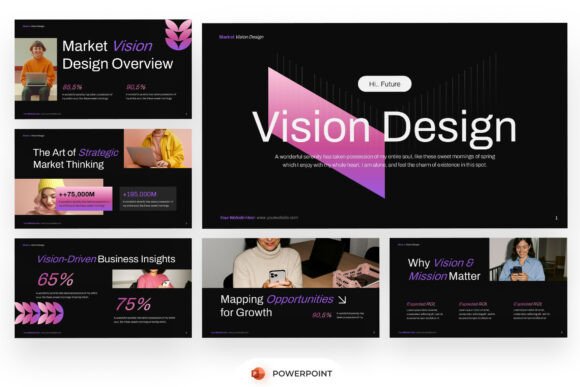
When you're preparing to communicate a complex business idea—whether it's a new market entry strategy, a rebranding initiative, or an investor pitch—the presentation isn’t just a supporting document. It’s the lens through which your audience interprets credibility, vision, and execution readiness. Market Vision Design PowerPoint is built for that precise moment: when insight must translate into influence. It’s not a generic deck—it’s a purpose-built framework for strategic storytelling, grounded in high-contrast visuals, intentional layout hierarchy, and functional flexibility.
Where It Fits in Your Planning and Delivery Workflow
This template enters your process where analysis meets articulation. Before finalizing a go-to-market plan, many teams generate spreadsheets, SWOT charts, and customer journey maps—but those assets rarely speak cohesively on their own. Market Vision Design PowerPoint serves as the integration layer: a place to synthesize research, align messaging, and structure narrative flow without starting from blank slides. You don’t wait until the last minute to build it. Instead, you slot in validated data points, refine visual metaphors as insights crystallize, and use its consistent structure to pressure-test logic across sections—vision statement to KPIs, brand positioning to competitive differentiation.
During stakeholder reviews or internal alignment sessions, the dark-layout aesthetic isn’t just stylistic—it reduces visual noise and directs attention to what matters: data highlights, annotated infographics, and image-driven value propositions. Because every slide is fully editable and built at 16:9 widescreen ratio, it scales seamlessly from laptop prep to boardroom projection without cropping or resizing surprises.
Real-World Use Cases Across Roles and Stages
For startup founders: You’re refining your Series A pitch deck. Rather than juggling inconsistent fonts, mismatched color palettes, and manually adjusted charts across 20+ slides, you drop your TAM analysis into the pre-styled market sizing section, insert your customer persona visuals into the image-focused composition slides, and align your growth roadmap with the timeline-infographic layout—all while preserving brand tone and strategic emphasis.
For marketing consultants: When delivering a quarterly brand audit to a client, consistency builds trust. Using Market Vision Design PowerPoint, you maintain uniform typography (with the included free font), apply gradient accents only where emphasis is needed—not decoration—and keep data callouts visually distinct from narrative commentary. That means less time formatting, more time interpreting.
For educators and trainers: Teaching strategic marketing or business model design? This template helps students move beyond bullet-point regurgitation. Its structured sections—vision, analysis, positioning, execution—model how professionals organize thinking. You can assign one slide per team, ask them to populate real-world examples, and use the template’s built-in visual logic to assess depth of understanding, not just slide design skill.
How It Works With Your Existing Tools and Habits
You don’t need to replace your workflow—you extend it. If you work in Notion or Airtable to track market research, copy-paste key findings directly into the relevant slides. If you use Excel for financial modeling, paste charts as editable objects (not static images) so stakeholders can see underlying assumptions. The template supports native PowerPoint features like Morph transitions and animation triggers, so if your team relies on subtle motion to guide attention during live delivery, those functions remain intact and easy to adjust.
Compatibility is practical, not theoretical. It opens reliably in Microsoft PowerPoint (desktop and web versions), and because it uses standard fonts and vector-based shapes—not embedded scripts or macros—it avoids version conflicts or rendering errors. No special software, no licensing hurdles, no cloud dependency beyond what you already use.
Customization Without Compromise
“Fully editable” doesn’t mean “endlessly fragile.” Every shape, text box, chart placeholder, and gradient overlay in Market Vision Design PowerPoint is designed to be modified without breaking alignment or visual rhythm. Need to swap out a bar chart for a stacked column? Drag the new chart into the same placeholder zone—the background, label styling, and spacing stay consistent. Want to shift from a dark-on-light to light-on-dark variant for accessibility? Adjust the master slide background once, and all content inherits the change.
The included help guide isn’t a PDF full of vague instructions. It’s a concise, task-oriented reference—e.g., “How to update the color palette across all slides,” “How to resize infographic icons proportionally,” “How to replace stock image placeholders with your own assets.” It assumes you’re time-constrained and value precision over theory.
What’s Inside the Package—and What Isn’t
You receive two core files: the main PowerPoint (.pptx) file and the help guide (PDF or .docx, depending on version). Everything inside is production-ready—no locked layers, no hidden watermarks, no trial limitations. All fonts are embedded or freely available, so sharing with collaborators won’t trigger substitution warnings.
Stock images are intentionally excluded. That’s deliberate—not a limitation. It ensures you bring your own authentic visuals: product shots, team photos, custom illustrations, or licensed assets aligned with your brand guidelines. It also keeps file size lean and avoids unintentional copyright exposure from generic stock.
Building Consistency Into Long-Term Use
Templates gain value over time—not just per presentation, but across projects. Teams using Market Vision Design PowerPoint for six months or more often report stronger internal alignment because the structure reinforces shared language: “vision” isn’t vague—it’s the first slide, with defined criteria; “positioning” isn’t abstract—it’s mapped against competitors in a dedicated matrix slide; “growth levers” aren’t buried in appendices—they’re called out with icon-led clarity.
To sustain that consistency, treat the template as a living asset. Save a master version with your company’s logo, primary colors, and approved disclaimer footers. Duplicate it for each new project instead of editing the original. Archive past decks—not just for reference, but to spot patterns: Which slide types get revised most often? Where do audiences pause or ask follow-ups? That feedback loop turns presentation design into continuous improvement.
Practical Tips for Smoother Implementation
- Start with the spine, not the slides. Identify your 3–5 non-negotiable narrative anchors—e.g., “Our unique insight about underserved SMB buyers,” “The three-phase rollout timeline,” “Why this solves a $2B pain point”—and map them to the template’s core sections before adding detail.
- Use image placeholders intentionally. Don’t fill them just to check a box. Ask: Does this visual clarify, contrast, or confirm the point? If not, leave it blank—or use a subtle texture or gradient block to maintain rhythm.
- Test readability early. Project the deck in a dim room at 100% zoom. If body text requires squinting or headings blend into backgrounds, adjust contrast—not just font size. The dark layout works because it’s calibrated; overriding it without testing undermines its strength.
- Batch your edits. Change all heading fonts in one pass. Update all data callout styles together. Then review flow. This prevents minor inconsistencies from accumulating and forcing rework later.
Ultimately, Market Vision Design PowerPoint succeeds not because it looks bold—but because it removes friction between thinking and showing. It gives structure to ambiguity, weight to evidence, and polish to preparation—without demanding design expertise or hours of tinkering. Whether you’re briefing a C-suite audience, guiding a student cohort, or pitching your first client, it supports the work you’ve already done, so the message lands—not the medium.